How Product Catalog Structure Affects Ecommerce SEO, Navigation and Growth
September 26, 2026
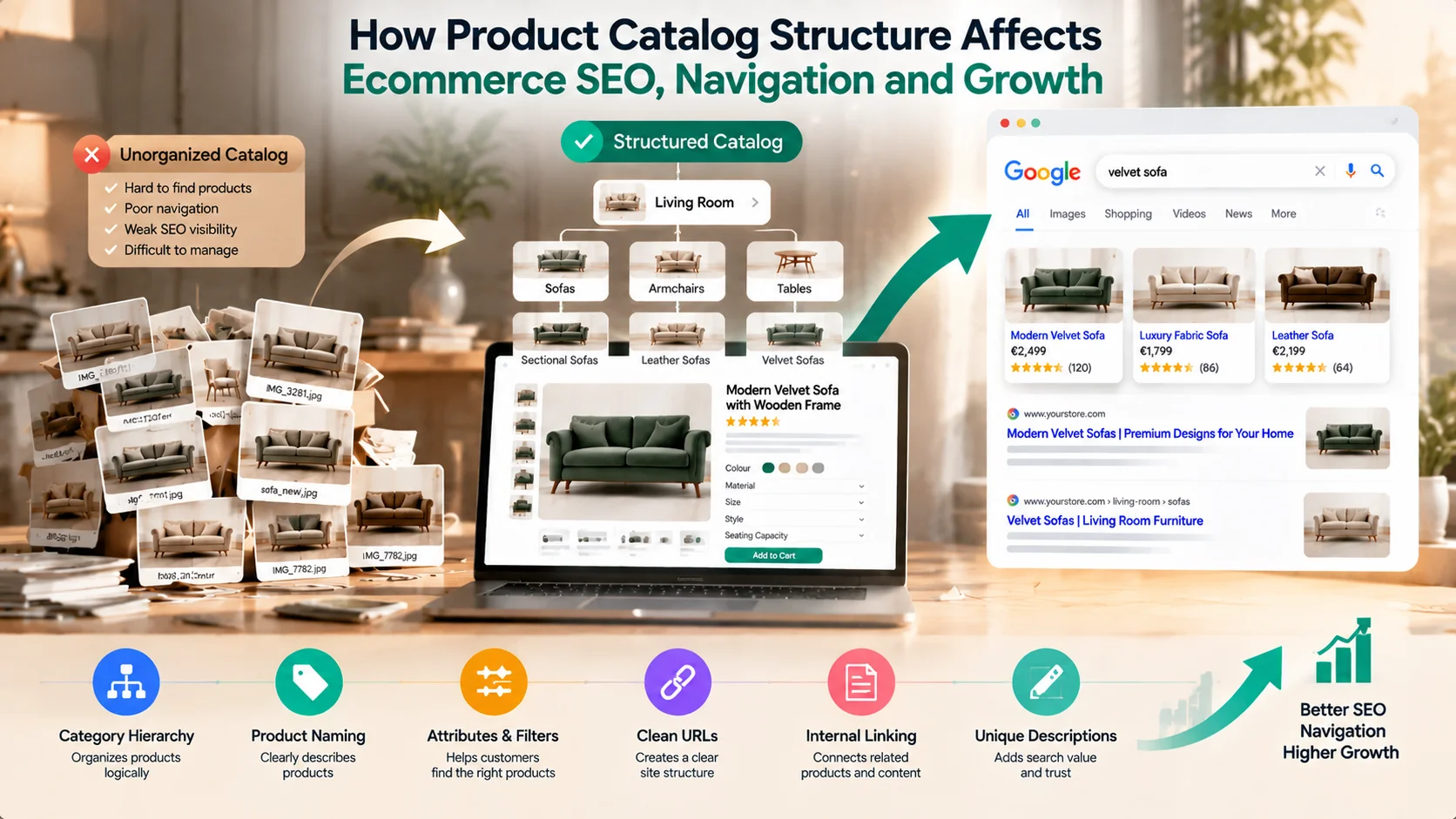
A successful ecommerce website depends on more than having quality products and an attractive storefront. Behind every easy shopping experience and strong search visibility is a well-organized product catalog structure. When products are arranged logically, with clear categories, meaningful attributes, optimized URLs and strong internal connections, both customers and search engines can understand the store more effectively.
Many businesses focus on adding more products to increase sales opportunities, but growth without proper organization can create complexity. Customers struggle to find what they need, search engines fail to understand product relationships, and internal teams spend more time managing unnecessary catalog issues.
A strong catalog structure acts as the foundation connecting SEO, navigation and daily operations. Whether a business has fifty products or thousands of SKUs, the way products are organized directly influences discoverability, user experience and scalability. With the right ecommerce solutions, businesses can create structured catalogs that support both customer journeys and long-term growth.
Why Product Catalog Structure Matters in Ecommerce
A product catalog is not simply a list of products displayed on a website.
It is a system that defines how products are organized, discovered and managed.
A well-structured catalog helps:
Consider two ecommerce websites selling furniture.
The first website organizes products as:
Home → Products → Item 1, Item 2, Item 3
The second website uses:
Home → Living Room → Sofas → Sectional Sofas → Leather Sectional Sofas
The second structure provides much clearer context.
Customers immediately understand where they are, while search engines can better understand relationships between categories and products.
Google emphasizes that logical site structures and clear internal links help search engines discover and understand website content more effectively. (developers.google.com)
This means catalog structure is not only an operational decision.
It is also an SEO decision.
Category hierarchy determines how products are grouped and how users move through the website.
A strong hierarchy follows the way customers naturally search.
For example:
Furniture
→ Living Room Furniture
→ Sofas
→ Velvet Sofas
→ Blue Velvet Sofas
This creates multiple levels of relevance.
A customer searching broadly for “living room furniture” can enter at a higher category level.
A customer searching specifically for “blue velvet sofa” can reach a more targeted product group.
Customers spend less time searching and more time exploring products.
Search engines can understand which pages represent broader topics and which pages represent specific products.
Businesses can create category pages, buying guides and marketing campaigns around clearly defined groups.
A common mistake is creating too many categories too early.
For example:
If these categories contain almost identical products, they may create confusion instead of improving navigation.
A good category structure should be based on meaningful customer differences, not simply additional keyword variations.
Product names are one of the strongest signals within an ecommerce catalog.
A product title should communicate important information clearly.
Weak product name:
Model X450
Better product name:
Modern Oak Dining Table with Extendable Wooden Top
The second version immediately explains:
A good naming framework often includes:
Product Type + Key Attribute + Differentiating Feature
Examples:
However, product naming should avoid unnecessary keyword repetition.
A title written only for search engines often creates a poor customer experience.
The goal is clarity.
A customer should understand the product before opening the page.
Attributes describe the characteristics that differentiate products.
Examples include:
Attributes are important because modern ecommerce depends heavily on structured information.
A product is no longer just:
“Brown Sofa”
It becomes:
This information supports:
Google recommends providing structured product information to help search engines better understand ecommerce products and display relevant information across search experiences. (developers.google.com)
A strong attribute system also improves internal operations because teams can manage thousands of products consistently.
Filters help customers narrow large catalogs quickly.
A furniture website may allow filtering by:
An electronics store may use:
Filters improve user experience, but they require careful management.
Poorly configured filters can create thousands of unnecessary URLs.
For example:
A category with:
can technically create hundreds of combinations.
Not every combination deserves a separate search-engine index.
A strong ecommerce website should decide:
Which filtered pages are valuable?
Which pages should remain for user navigation only?
This balance protects SEO while maintaining a useful shopping experience.
URLs provide another layer of information about website structure.
A clean URL communicates page purpose.
Example:
Poor:
website.com/product?id=45278
Better:
website.com/living-room/sofas/velvet-sofa
The second URL provides context.
It helps:
Good ecommerce URLs should be:
Avoid unnecessary parameters, random numbers and constantly changing URL structures.
A stable URL system becomes increasingly important as product catalogs grow.
Internal links create pathways between related pages.
They help customers discover more products while helping search engines understand website relationships.
A strong ecommerce internal linking structure might look like:
Category Page
↓
Product Page
↓
Related Products
↓
Buying Guide
↓
Supporting Category
For example:
A “Luxury Sofa” product page could link to:
This creates a connected ecosystem instead of isolated pages.
Without internal linking, valuable product pages may remain disconnected from the rest of the website.
Many ecommerce businesses copy product descriptions from suppliers.
This creates a major problem.
If hundreds of websites publish identical descriptions, there is little reason for search engines to prioritize one page over another.
Unique product descriptions should explain:
For example, instead of:
“Premium wooden dining table with elegant design.”
A stronger description could explain:
“Designed for refined dining spaces, this extendable oak dining table combines natural wood character with practical flexibility for family gatherings and hospitality interiors.”
The second version provides more context and commercial value.
SEO and user experience are often treated separately.
In reality, they are connected.
A confusing catalog creates problems for both:
Customers cannot find products.
Search engines cannot understand relationships.
A good catalog structure improves:
A customer who easily finds related products is more likely to continue exploring.
For example:
A visitor searching for a dining table may also need:
A connected catalog naturally creates additional purchase opportunities.
Catalog structure also affects internal business processes.
As businesses grow, poor organization creates operational challenges.
Teams may struggle with:
This is where ecommerce management services become valuable.
A structured catalog allows teams to:
A catalog designed only for customers may fail operationally.
A catalog designed only for internal teams may create poor customer experiences.
The best structure supports both.
A modern ecommerce website builder should provide more than storefront design.
It should support:
The technology should make catalog management easier as the business grows.
However, software alone cannot create a successful catalog.
Businesses still need:
The platform provides the framework.
The business provides the structure and strategy.
A Practical Product Catalog Optimization Framework
Before expanding a catalog, review these five areas:
Are products organized according to customer buying behavior?
Do product titles clearly explain what each product is?
Can customers filter and compare products easily?
Does each product provide unique and useful information?
Are products, categories and guides connected through internal links?
This framework helps businesses identify whether catalog problems are affecting SEO, usability or operations.
How Idiocom Supports Scalable Ecommerce Catalog Management
Idiocom is designed around the idea that ecommerce growth requires connected systems.
A growing online business needs more than product pages. It needs structured product management, order workflows, SEO capabilities, analytics and multi-channel support working together.
Idiocom helps businesses create and manage ecommerce operations through connected tools for store creation, product management, orders, payments, shipping and growth-related workflows.
A strong catalog foundation allows businesses to improve visibility, simplify operations and create better customer experiences.
Technology helps manage complexity.
Strategy determines how effectively that complexity is organized.
Final Takeaway
Product catalog structure is one of the most important foundations of ecommerce growth.
A well-organized catalog improves search visibility, simplifies navigation, supports marketing efforts and makes daily operations easier.
Category hierarchy helps customers discover products. Product naming improves clarity. Attributes support filtering and structured data. Clean URLs strengthen website organization. Internal links connect related content. Unique descriptions create additional search value.
For businesses planning long-term growth, catalog structure should not be treated as a simple setup task.
It is an ongoing system that connects SEO, user experience and operations.
The strongest ecommerce solutions are not only built to display products.
They are built to help customers discover, understand and purchase them efficiently.

Growing an online store often comes with a common assumption—you need to spend more on advertising to generate more...
Ever notice how the grocery store strategically places chips and salsa right next to the dip? That’s not a coin...

Launching an online store is an exciting step for any business, but choosing the right platform is just as important ...