Start Your Idiocom Free Trial
Create your account, verify your email and access your Idiocom merchant dashboard.
Creating an Idiocom account only takes a few steps. You’ll need an active email address that you can access for verification.
Before You Begin
Keep access to the email address you want to use with your Idiocom account. Idiocom will send a verification code to this address before your account is activated.
1. Start Your Free Trial
Click on Start Free Trial .Go to the Idiocom Free Trial page.
Enter your email address in the field provided, then select Start Free Trial.
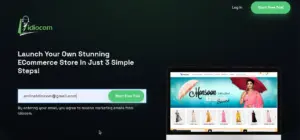
The email address you enter here will be carried forward to your account registration.
2. Create Your Idiocom Account
After selecting Start Free Trial, you’ll be taken to the Create An Idiocom Account form.
Enter your:
- First name
- Last name
- Email address
- Password
- Captcha code
Review and accept the Terms and Conditions and Privacy Policy, then select Create Idiocom Account.
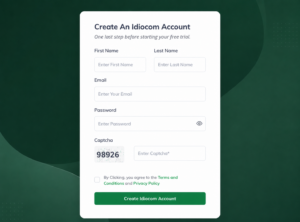
Your email address may already appear in the form if you entered it on the previous page.
3. Verify Your Email
Idiocom will send a verification code to the email address you used to register.
Enter the OTP on the verification screen and continue to verify your account.
If you don’t receive the code, check your spam or junk folder before requesting another one.
4. Open Your Merchant Dashboard
Once your email is verified, you’ll be taken directly to your Idiocom Merchant Dashboard.
This is your main account area where you can create and access the stores connected to your Idiocom account.
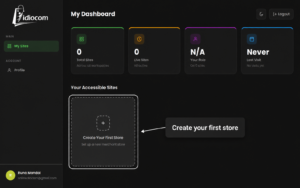
If this is your first time using Idiocom, you’ll see Create Your First Store in the Your Accessible Sites section.
Your account is now ready.
Next Step
Continue with Create Your First Store to begin creating your ecommerce store inside Idiocom.
Quick Steps
- 1 Start Your Free Trial
- 2 Enter Your Account Details
- 3 Verify Your Email
- 4 Open Your Merchant Dashboard






