Create Coupons & Discounts
Create promotional offers, set discount rules and manage active coupons for your store.
From the Merchant Dashboard, go to Products → Coupon and click Create Coupon. Fill in the coupon details such as the coupon code, discount, validity period, eligibility and applicable settings. When everything is configured, click Save to create the coupon.
Once created, the coupon will appear in your coupon list. You can use the status toggle to activate or deactivate a coupon whenever required.
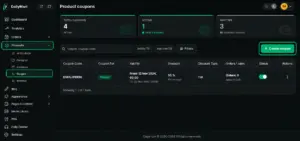
Place the coupon listing screenshot here and highlight Products → Coupon and Create Coupon.
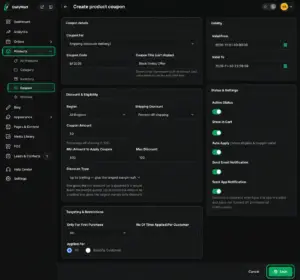
Place the coupon creation form here and highlight the main discount settings and Save button.
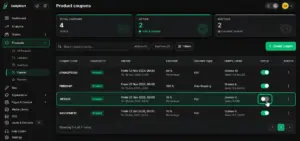
Place the coupon listing screenshot here to show how merchants can activate or deactivate an existing coupon.
Quick Steps
- 1 Go to Products
- 2 Select Coupon
- 3 Click Create Coupon
- 4 Enter the coupon and discount details
- 5 Set validity and eligibility
- 6 Click Save
- 7 Activate or deactivate coupons as needed






