Connect Your Own Domain
Use your own domain to give your storefront a professional, branded web address.
When you start with the Idiocom Free Trial, your store goes live with an Idiocom-provided domain. If you already own a domain, you can connect it to your store anytime and use it as your storefront address.
Where to go:
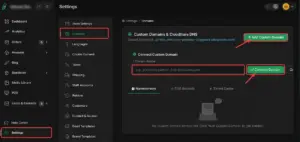
Merchant Backend Dashboard → Settings → Domains → Add Custom Domain
Enter your domain name, then click Connect Domain to link it with your Idiocom store.
Quick Steps
- 1 Open Merchant Backend Dashboard
- 2 Go to Settings → Domains
- 3 Click Add Custom Domain
- 4 Enter your domain name
- 5 Click Connect Domain
Tip: Make sure you own the domain and enter the correct domain name before clicking Connect Domain.






