Raise a Support Ticket
Get Help When You Need It
If you run into a technical issue or something isn’t working as expected, Idiocom Help Center lets you raise a support ticket directly from your merchant dashboard. Share the issue with the technical team and they can review it and help resolve it.
How to Raise a Ticket
1. Open Help Center
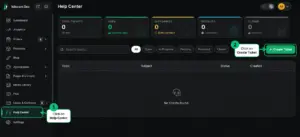
From your merchant dashboard, go to Help Center.
2. Create Your Ticket
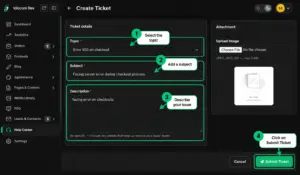
Click Create Ticket and provide the relevant details such as the issue topic, subject and description. You can also attach an image if it helps explain the problem.
3. Submit & Get Support
Submit the ticket and the Idiocom technical team can review the issue and work with you toward a resolution.
Quick Steps
- 1 Help Center
- 2 Create Ticket
- 3 Describe the Issue
- 4 Add Attachment (if needed)
- 5 Submit Ticket
Tip: Be as specific as possible when describing the issue. Adding a screenshot can help the support team understand the problem faster.






