SEO & Visibility
Help search engines discover your store and keep your product listings connected to shopping channels.
From the Merchant Dashboard, go to Settings → SEO & Feeds. Here you can manage the feeds that help search engines and shopping platforms access your store and product information.
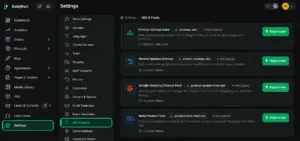
- Primary Sitemap — Helps search engines discover your main store pages and products.
- Recent Updates Sitemap — Helps highlight recently changed products and store content.
- Google Shopping Product Feed — Sends your product catalogue to Google Merchant Center and Google Shopping.
- Meta Product Feed — Connects your product inventory with Facebook Shops, Instagram Shopping and Meta Ads.
Quick Steps
- 1 Open Settings
- 2 Select SEO & Feeds
- 3 Review your available sitemaps and product feeds
- 4 Regenerate a feed when your store data needs updating
Tip: Keep your product information updated so your sitemap and product feeds reflect the latest store data.






