New to Idiocom? Start Here
Set up the basics of your Idiocom store and get ready to start managing your business.
When you start your Idiocom free trial, you’ll be guided through a simple store setup. You don’t need to configure everything at once — complete the basics first and Idiocom will guide you through each step.
Your Store Setup
Your initial setup includes four steps:
1. Choose Your Country
Select the primary country where your business operates. This helps Idiocom prepare the relevant store settings for your business.
2. Add Your Store Details
Add the basic information customers need to know about your business.
From the setup screen, select Add Details and complete the required store information.
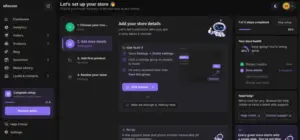
You can always return to the setup from your Idiocom dashboard if you haven’t completed it yet.
3. Add Your First Product
Add the first product you want to sell, including its essential information, pricing and images.
Learn more: Add & Manage Your Products
4. Review Your Store
Check the information you’ve added and review your store before moving forward.
Once these basic steps are complete, you can continue setting up payments, shipping, your domain, SEO and other parts of your store.
Continue Setting Up Your Store
After completing the initial setup, you may want to:
- Connect a Payment Gateway
- Set Up Shipping & Delivery
- Connect Your Own Domain
- Get Your Store Ready for Search
You can complete these whenever you’re ready.
Quick Steps
- 1 Choose Your Country
- 2 Add Your Store Details
- 3 Add Your First Product
- 4 Review Your Store






