Set Up Categories
Organize your products into clear categories so customers can easily browse your store and find the products they are looking for.
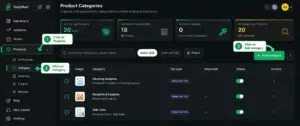
From the Merchant Dashboard, go to Products → Category to manage your product categories.
Click Products in the dashboard, select Category, then click Add Category to start creating a new category.
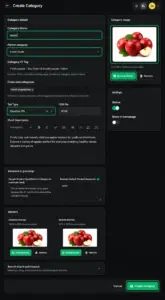
Enter the category name and complete the relevant details, including the category image, parent category, description, keywords and other required fields. Add the information that best describes the products in this category.
Quick Steps
- 1 Products → Category
- 2 Add Category
- 3 Fill in category details
- 4 Create Category
Tip: Once all required details are complete, click Create Category. Your new category will be added to your store and can be used to organize related products.






