Connect a Payment Gateway
Connect payment methods that make checkout simple for your customers.
Set up how your customers pay for orders by connecting an online payment gateway or enabling a manual payment method.
From the Merchant Dashboard, go to Settings → Payments. You’ll find two types of payment options:
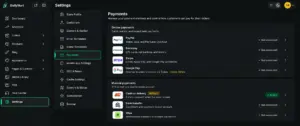
1. Online Payments
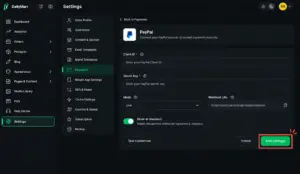
Connect a supported payment gateway such as PayPal, Razorpay or Stripe. Select the payment method you want to use, enter the required credentials or API details and enable Show at checkout. Then click Save Changes to activate the payment method for your customers.
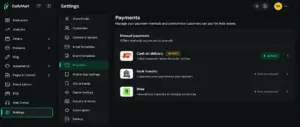
2. Manual Payments
You can also accept payments without an online gateway. Cash on Delivery is available by default, while options such as Bank Transfer and Wise can be connected by entering the required details and activating the method.
Quick Steps
- 1 Open Settings → Select Payments
- 2 Choose a payment method → Online or Manual
- 3 Enter the required details → Credentials or payment information
- 4 Enable the method → Make it available at checkout
- 5 Save Changes → Your payment method is ready to use






