Manage Leads & Customer Enquiries
Keep customer enquiries organized, respond quickly and stay connected with your audience.
Manage Customer Enquiries
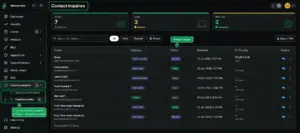
From the Merchant Dashboard, go to Leads & Contacts → Contact Inquiries. Here you can view messages and enquiries submitted by customers through your store.
You can check the enquiry details, see whether it is New, Seen or Replied, and respond directly to customers when follow-up is needed. This gives you one place to manage customer conversations and make sure important enquiries do not get missed.
Stay Connected with Newsletter Subscribers
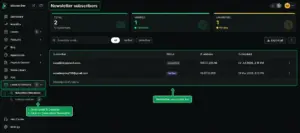
You can also manage people who subscribe to your store newsletter from Leads & Contacts → Subscribed Newsletter. View your subscribers and their verification status so you can keep your audience updated with your latest products, offers and store news.
Why It Matters
Customer enquiries can become valuable sales opportunities when they are handled on time. Keeping enquiries and newsletter subscribers organized helps you respond to customers, follow up with potential buyers and maintain ongoing communication with your audience.
Quick Steps
- 1 Open your Merchant Dashboard
- 2 Go to Leads & Contacts
- 3 Select Contact Inquiries to view customer messages
- 4 Review the enquiry and reply when needed
- 5 Select Subscribed Newsletter to view subscribers
- 6 Check subscriber status and stay connected with your audience






