Manage Your Team
Add team members, control access and keep your store operations organized.
Managing an ecommerce store often involves more than one person. Idiocom lets merchants add staff members and control what each team member can access from the dashboard.
Why Team Management Matters
With Staff Accounts, merchants can bring their team into the store management workflow without sharing one account. Each staff member can have their own login and access can be managed based on the sections they need to work with.
How to Add a Team Member
Step 1 — Open Staff Accounts
From the merchant dashboard, go to Settings → Staff Accounts.
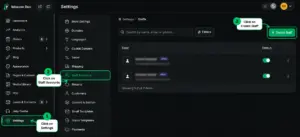
Step 2 — Add Staff Details
Click Create Staff and enter the team member’s required details such as name, email, phone and account status.
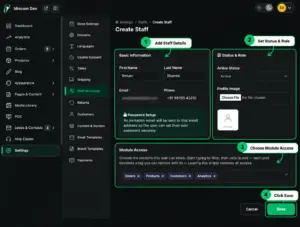
Step 3 — Set Access & Save
Choose which areas of the dashboard the staff member can access, then save the account.
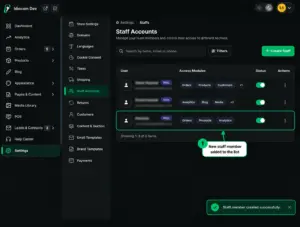
Quick Steps
- 1 Settings
- 2 Staff Accounts
- 3 Create Staff
- 4 Add Details
- 5 Set Access
- 6 Save






