Idiocom Quick Demo
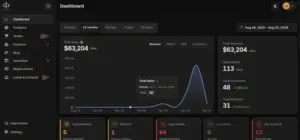
Take a quick look at the Idiocom dashboard and see how you can manage your store, products, orders and business from one place.
The Idiocom Quick Demo gives you a simple overview of the platform and the main areas you’ll use to manage your ecommerce business.
In just a few minutes, you can see how your store, products, orders, customers and day-to-day operations come together inside one dashboard.
What You’ll See
The quick demo gives you a look at:
- Your Idiocom dashboard and key store activity
- Products and catalog management
- Orders and customer activity
- Storefront and business settings
- Analytics and performance
- Leads, contacts and other connected business areas
It’s designed to help you understand the platform quickly before you move into the full walkthrough or start setting up your own store.
Quick Steps
- 1 Explore Your Idiocom Dashboard
- 2 Manage Products & Storefront
- 3 Handle Orders, Payments & Shipping
- 4 Track Sales & Store Performance
- 5 Grow with SEO, AI & Sales Channels
Tip: Want a closer look? Explore the Full Idiocom Platform Walkthrough to see each area in more detail and understand how the platform works from end to end.






